
The Accessibility Trap: How ATAG Prevents Costly Accessibility Issues
August 14, 2026
By Disha
Over the past three years of auditing digital products, I have witnessed the same story unfold across organizations of every size. But over the last year, the story has taken on a new urgency.
I’ve been working closely with businesses that are completely new to digital accessibility. Most of them didn’t begin this journey because accessibility suddenly became a strategic priority. They came because of legal notices, compliance requirements, customer complaints, or impending court cases.
By the time they reach an accessibility audit, they’re under immense pressure to fix everything as quickly as possible.
That’s when I repeatedly hear the same sentence:
“We want to fix these accessibility issues, but our CMS won’t let us.”
Developers want to correct the code. Content authors want to improve their pages. Designers want to make better decisions. Yet the very tools they rely on often prevent them from making those improvements.
And here’s the real trap.
Organizations assume that accessibility is only about training people to follow WCAG. So they invest in workshops, documentation, and audits, hoping future content will be better. Yet months later, many of the same accessibility issues return—not because people ignored the training, but because their authoring tools continue encouraging inaccessible content.
If the software your teams use every day makes it easy to create inaccessible content, you’re asking people to fight against their own tools.
That’s a battle no organization can win consistently.
But what if you could prevent many of these problems before they ever reached production?
That’s exactly where ATAG (Authoring Tool Accessibility Guidelines) enters the picture.
ATAG: Accessibility Starts Before Your Website Exists
When organizations think about accessibility, they almost always think about WCAG (Web Content Accessibility Guidelines).
WCAG evaluates the final product—the website, application, or digital document your customers interact with.
ATAG, another international standard published by the W3C, focuses on something different.
It looks at the software used to create that content.
This includes:
- Content Management Systems (CMS)
- No-code and low-code website builders
- Code editors
- Content publishing platforms
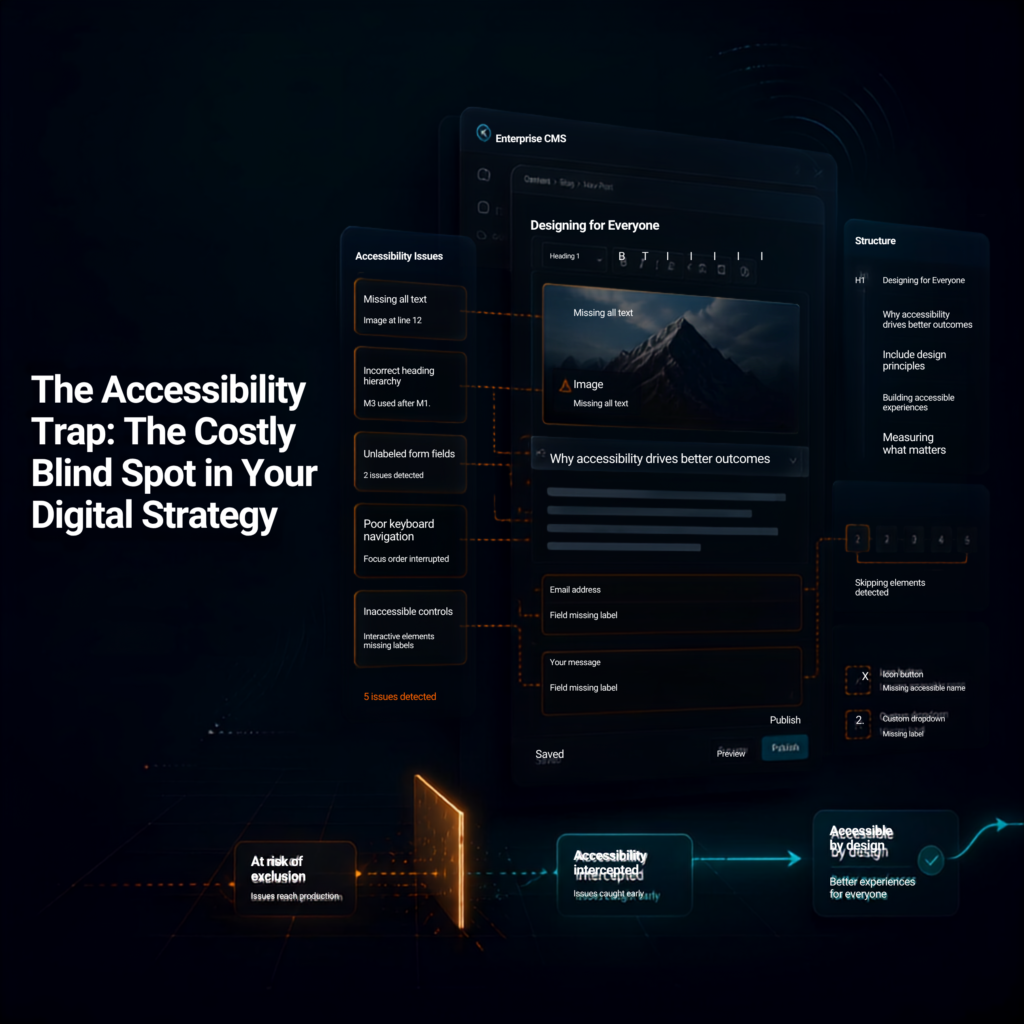
In simple terms, ATAG helps organizations build accessibility into the content creation process instead of fixing problems after publication.
ATAG achieves this through two equally important principles.
First, the authoring tool itself should be accessible.
The people creating websites and content may themselves have disabilities. Whether someone uses a screen reader, keyboard navigation, voice input, or another assistive technology, the authoring environment should allow them to perform their work independently.
Second, the tool should actively help every author create accessible content.
Rather than expecting every content creator to become an accessibility expert, the software provides guidance and safeguards throughout the publishing process.
Imagine a CMS that:
- prompts authors to provide meaningful alternative text before publishing an image,
- encourages proper heading structures instead of manual font styling,
- warns authors when form controls are missing labels,
- reminds editors to write descriptive link text rather than “Click Here.”
Instead of relying entirely on memory and repeated training, accessibility becomes part of the normal publishing workflow.
The software helps people make better decisions from the beginning.
This is often called shifting accessibility left—addressing accessibility during content creation rather than discovering problems months later during an audit.
For businesses, that means fewer recurring defects, more consistent quality, and significantly less time spent fixing preventable issues.
The Reality Check: ATAG Is Powerful, But It Isn’t Magic
At this point, many business leaders arrive at an understandable conclusion.
“If we purchase an ATAG-compliant CMS, do we still need accessibility audits?”
The answer is yes.
ATAG is an incredibly strong foundation, but it is not a substitute for human expertise.
Automation can verify whether something exists.
It cannot determine whether it is appropriate.
Consider a few examples.
An ATAG-compliant editor can require authors to enter alternative text before an image is published.
But it cannot determine whether the alternative text actually describes the image or simply contains meaningless keywords.
A tool can encourage proper heading structures.
It cannot judge whether the content itself is organized logically for users.
Automation can detect missing labels.
It cannot evaluate whether instructions are understandable, whether a checkout process creates unnecessary cognitive barriers, or whether complex interactions are genuinely usable for people with disabilities.
Many WCAG 2.2 success criteria depend on context, usability, and human judgment—things software simply cannot evaluate with complete accuracy.
This is why accessibility professionals remain essential.
ATAG doesn’t replace your auditors.
It makes their work more valuable.
Instead of spending hours identifying repetitive issues like missing labels, incorrect heading structures, or empty alternative text fields, accessibility specialists can focus on what truly requires human expertise: usability, interaction design, user journeys, and real-world accessibility experiences.
Rather than replacing manual audits, ATAG makes those audits more focused, efficient, and meaningful.
Accessibility Also Begins with the People Building Your Products
There’s another part of ATAG that deserves far more attention.
Accessibility isn’t only about helping organizations produce accessible websites.
It’s also about ensuring that the people creating those websites can participate fully in the workplace.
Today, there are exceptionally talented developers, QA engineers, content authors, designers, and accessibility specialists with disabilities.
Yet many encounter barriers before they even begin their work.
The problem isn’t a lack of skill.
It’s inaccessible authoring environments.
A CMS dashboard that cannot be operated with a keyboard.
An editor that doesn’t expose information correctly to screen readers.
A publishing interface that assumes every user relies on a mouse.
These barriers quietly exclude capable professionals from contributing their expertise.
When organizations choose ATAG-compliant authoring tools, they remove those barriers.
They create workplaces where professionals with disabilities can contribute alongside everyone else using the assistive technologies they depend on every day.
For businesses committed to diversity and inclusion, this is more than compliance.
It’s an opportunity to build stronger teams by ensuring that talented people aren’t excluded because of the software they are expected to use.
A Smarter Accessibility Strategy
Digital accessibility isn’t achieved through audits alone.
Nor is it achieved through training alone.
And it certainly isn’t achieved by expecting people to overcome software that works against them.
The most successful accessibility programs recognize that quality begins much earlier.
It begins with the tools employees use every single day.
WCAG remains the benchmark for measuring accessible digital experiences.
Manual testing remains essential for evaluating usability and real-world experiences.
But ATAG helps prevent many common accessibility problems before they ever become expensive defects.
That’s a smarter investment—for your teams, your customers, and your business.
The next time your organization evaluates a new CMS, content editor, publishing platform, or website builder, don’t limit the conversation to features, pricing, and performance.
Ask one additional question:
“How does this tool help us create accessible content?”
Better still, ask whether the vendor supports ATAG.
That single question could reduce future remediation costs, strengthen your accessibility program, improve content quality, and create a more inclusive workplace from the very beginning.
Accessibility doesn’t start when an auditor opens your website.
It starts much earlier—with the tools you choose long before your customers ever visit it.